
Collect TG-51 Charge Readings
Use Read in a charge-entry panel to collect readings from a connected electrometer.
Before Collection
Section titled “Before Collection”Confirm:
- The intended TG-51 data set and energy are selected.
- The connected physical electrometer matches Equipment.
- The ion chamber is connected and positioned at the depth displayed by the wizard.
- The requested bias is appropriate for the selected chamber calibration.
- The planned monitor-unit delivery is ready.
Collect Readings
Section titled “Collect Readings”- Check the depth-verification box in the active wizard step.
- Click Read beside the charge-entry field.
- Confirm Charge Collection displays the expected bias.
- Wait while Quadrant checks the range, bias, and zero.
- Wait for Ready for collection and Awaiting beam on.
- Deliver the planned monitor units.
- Turn the beam off.
- Wait for the charge to appear in Collected Charges.
- Repeat the beam delivery when additional readings are required.
- Click Stop Collection after the final reading.
- Review the values.
- Click Done to add them to the wizard or Discard to abandon them.
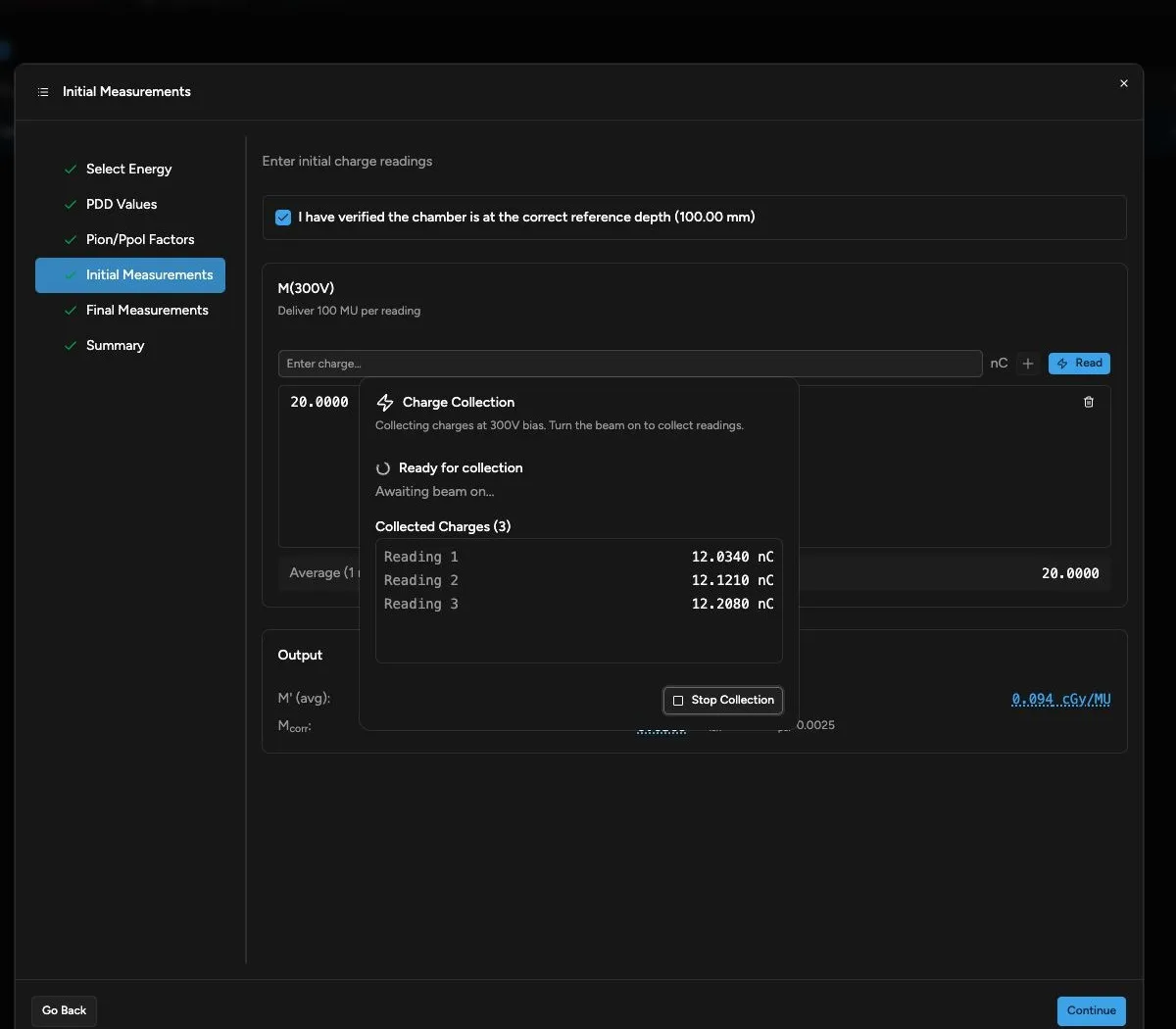
What Quadrant Displays
Section titled “What Quadrant Displays”During collection, the status can progress through:
- Setting the range
- Checking the target bias
- Verifying or performing zero
- Starting collection
- Awaiting beam on
- Awaiting beam off
- Reading charge
The collected readings are not added to the calibration until you click Done.
Manual Entry
Section titled “Manual Entry”You can enter a charge in the text field and click the add control instead of using a live device. Quadrant lists each reading and calculates the average.
Copy controls can reuse readings from an earlier applicable step, such as:
- Pion/Ppol measurements
- Electron Pgrad measurements
- Initial measurements
Always verify copied readings are appropriate for the displayed voltage and depth.
Stop or Recover
Section titled “Stop or Recover”- Click Stop Collection to end the active routine.
- Click Discard to close without adding the collected readings.
- If the connection is lost, stop collection, reconnect the device, verify the setup, and restart the reading.
Confirm the Result
Section titled “Confirm the Result”After you click Done, confirm that the dialog closes and the readings appear in the charge-entry panel that opened it. Verify that the returned reading count and displayed Average match the accepted collected charges.
If the readings or average do not match, do not continue the calibration. Reopen charge collection or enter the verified readings manually.
Return to Add a Photon TG-51 Calibration or Add an Electron TG-51 Calibration and continue the active wizard step.