
Select or Create a TG-51 Data Set
Select the institution, linear accelerator, and TG-51 data set before reviewing or entering calibration data.
Select an Existing Data Set
Section titled “Select an Existing Data Set”- Open Calibration > TG-51.
- Click Change Linac or Select Institution and Linac.
- Select the institution.
- Select the linear accelerator.
- Click Browse data sets.
- Click the intended data-set name to open Calibrations.
- Confirm the header shows the intended institution, machine, and data set.
Create a Data Set with the Wizard
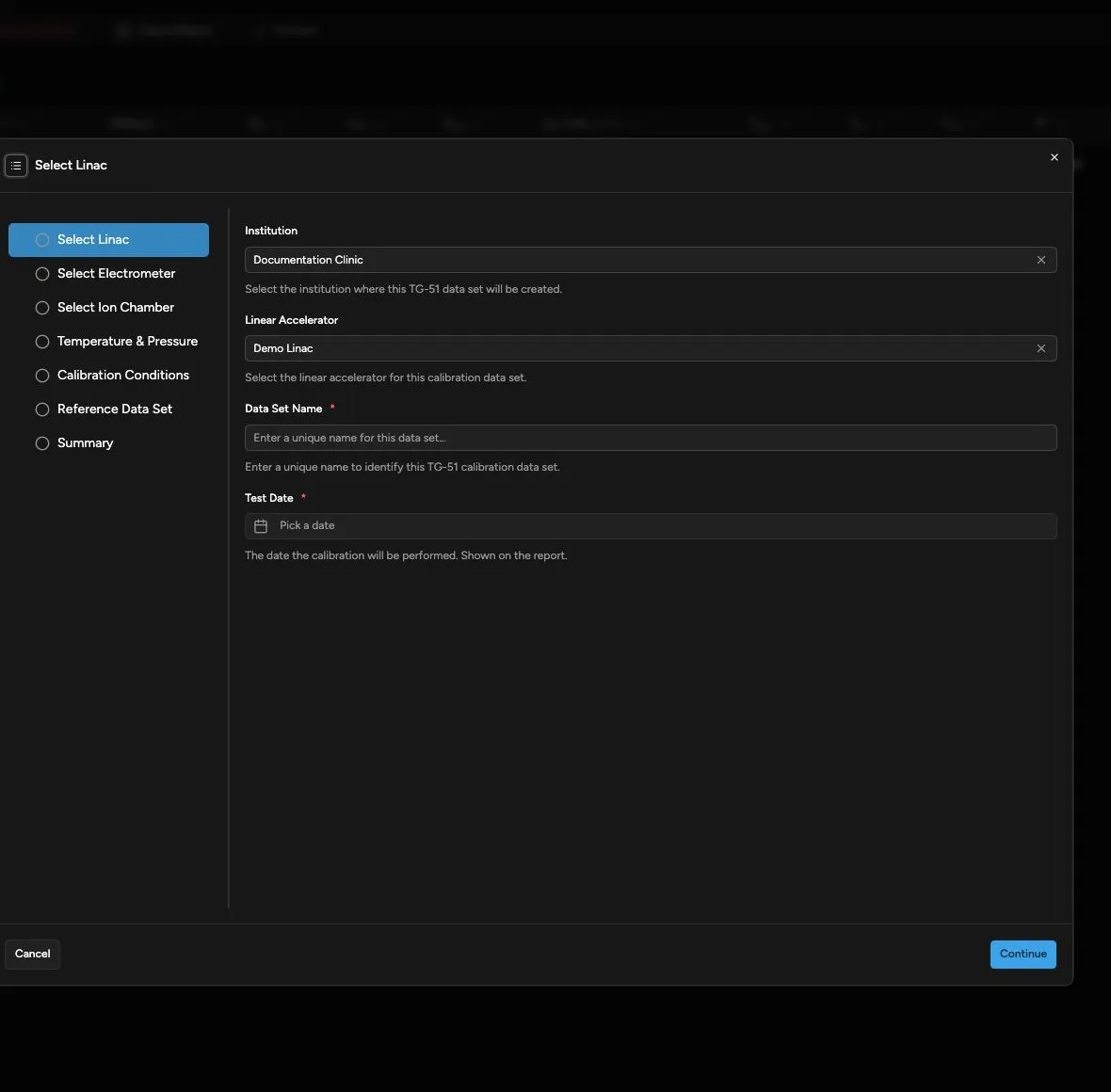
Section titled “Create a Data Set with the Wizard”Use Wizard when you want to enter the complete setup before creating the data set.
- Select the institution and linac in Linac Overview.
- Click New Data Set.
- In Select Linac, select the institution.
- Select the linear accelerator.
- Enter a data-set name.
- Select the test date.
- Click Continue.
- In Select Electrometer, select the electrometer with the calibration you will use.
- Click Continue.
- In Select Ion Chamber, select the chamber with the calibration you will use.
- Click Continue.
- In Temperature & Pressure, enter the measured temperature.
- Enter the measured pressure.
- Click Continue.
- In Calibration Conditions, select the photon reference field.
- Select SSD Setup or SAD Setup.
- If electron calibration is planned, select AAPM TG-51 (1999) or AAPM Report 385 (2024) under Electron Protocol.
- If electron calibration is planned, select the electron applicator.
- Click Continue.
- In Reference Data Set, select the scan data set that supplies PDD or TMR values when you intend to use one.
- Click Continue.
- In Summary, review every selection.
- Click Done.
Quadrant selects the new data set and opens its Equipment page.
Use Quick Add
Section titled “Use Quick Add”From a data-set page, click the data-set breadcrumbs to open the selector and choose Quick Add. Use Quick Add when you want to create the record first and complete the remaining setup from the TG-51 pages.
Quick Add includes:
- Select Linac
- Select Electrometer
- Select Ion Chamber
- Calibration Conditions
- Summary
It does not include Temperature & Pressure or Reference Data Set. Complete those pages before entering calibrations that depend on them.
Both creation paths include Electron Protocol under Calibration Conditions. AAPM TG-51 (1999) is the default. Read Understand TG-51 Protocols and Saved Evidence before selecting AAPM Report 385 (2024).
Confirm the Result
Section titled “Confirm the Result”After creating or selecting a data set:
- Confirm the header shows the expected institution, machine, and data-set name.
- Review all five setup pages.
- Confirm the equipment has active calibration information.
- Save setup changes before adding or editing photon or electron calibrations.
Continue with Edit TG-51 Data Set Details.