
Add an Electron TG-51 Calibration
Use Electron calibrations on Calibrations to add one calibration result for each electron energy.
Before You Begin
Section titled “Before You Begin”Confirm:
- The intended TG-51 data set is selected.
- The chamber, electrometer, and active calibrations are correct.
- Temperature and pressure are saved.
- The reference applicator and electron SSD match the measurement.
- The intended Electron Protocol is saved under Calibration Conditions.
- Any intended reference data set is saved.
- No setup changes are pending.
Understand the Electron Table
Section titled “Understand the Electron Table”| Column | What It Shows |
|---|---|
| Energy | Electron energy. When protocols are mixed, the row also shows its saved protocol. |
| Initial (cGy/MU) | Saved initial output. |
| Final (cGy/MU) | Saved final output. Select the value for equation details. |
| Change (%) | Percentage change from the saved initial output to the saved final output. |
| dref (mm) | Saved reference depth. |
| PDD(dref) | Percent depth dose at the reference depth. |
| R50 (mm) | Depth of the 50% dose point. |
| k′R50 or k′Q | Electron quality factor: k′R50 for AAPM TG-51 (1999), or k′Q for Report 385. |
| kecal or kQecal | Calibration factor: kecal for AAPM TG-51 (1999), or kQecal for Report 385. |
| dref + 0.5rcav (mm) | Effective point of measurement for AAPM TG-51 (1999). |
| Pgrad | Saved gradient correction for AAPM TG-51 (1999). |
| kQ | Combined beam-quality conversion factor for Report 385. |
| Pleak | Saved leakage correction for Report 385. |
| Prp | Saved radial-profile correction for Report 385. |
| Pion | Ion recombination correction. |
| Ppol | Polarity correction. |
| Mraw | Average uncorrected final-stage charge reading. |
| Mcorr | Corrected final-stage chamber reading. |
The quality-factor and calibration-factor headings follow the saved protocol. A mixed table shows both factor names. Original TG-51 columns appear for AAPM TG-51 (1999) results; Report 385 columns appear for Report 385 results. In a mixed table, cells for the other protocol show —.
Initial and Final identify saved measurement stages. Change (%) is 100 × (Final / Initial − 1). It appears when both saved outputs are positive; otherwise the cell shows —.
Add an Electron Calibration
Section titled “Add an Electron Calibration”- Open Calibration > TG-51 > Calibrations.
- Click Add.
- In Select Energy, select the electron energy.
- Click Continue.
- In PDD Values, select Use Reference Data Set or Enter Custom Values.
- If using reference data, verify the displayed PDD and R50 values.
- If using custom data, enter values from the verified source.
- Click Continue.
- In Pion/Ppol Factors, select an applicable existing factor set when one is available.
- If needed, click Create New Factors.
- If creating factors, complete the displayed charge measurements.
- Review the Pion/Ppol factor warnings.
- Click Continue.
- For AAPM TG-51 (1999), complete Conversion Factors and click Continue. Report 385 skips this step.
- In Initial Measurements, verify the chamber depth.
- Enter or collect the initial readings.
- Click Continue.
- In Final Measurements, verify the chamber depth.
- Enter or collect the final readings.
- Click Continue.
- In Summary, confirm the protocol label and review the warnings, inputs, source evidence, correction factors, equipment, measurements, equation details, and dose.
- Click Done.
- Confirm the energy appears in the electron table.
Enter PDD and R50
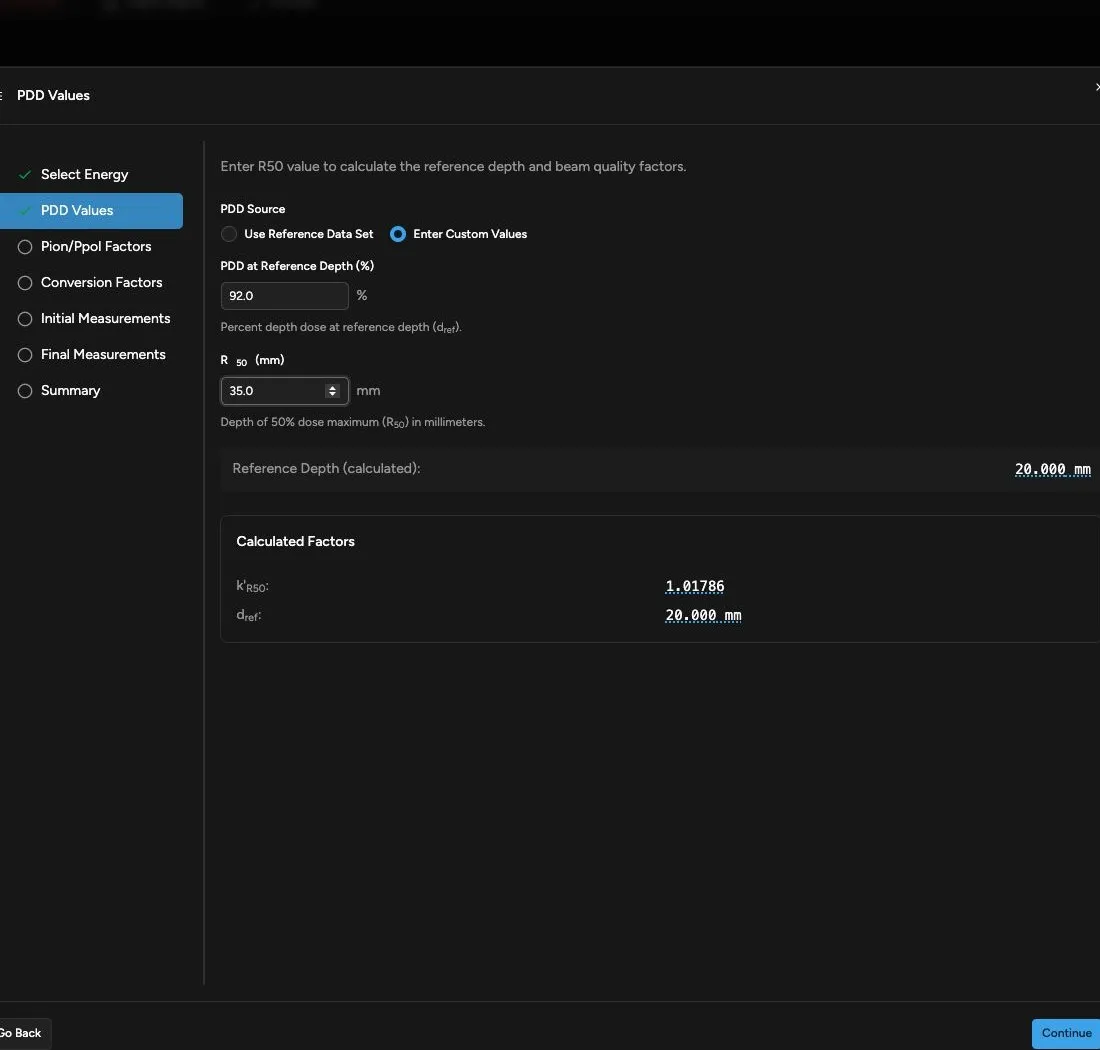
Section titled “Enter PDD and R50”Use matching reference scan data when it is available and verified. Otherwise, choose Enter Custom Values and enter:
- PDD at Reference Depth (%)
- R50 (mm)
Quadrant calculates the reference depth and related beam-quality factors. Review any R50 range warning before continuing.
For Report 385, also complete Report 385 Reference-Condition Evidence. Enter the measured surface field and beam-quality SSD, then confirm the displayed water-phantom, reference-dose geometry, clinical PDD geometry, distal R50, and chamber-position statements. See Understand TG-51 Protocols and Saved Evidence for the eligibility requirements.
Measure Pgrad for AAPM TG-51 (1999)
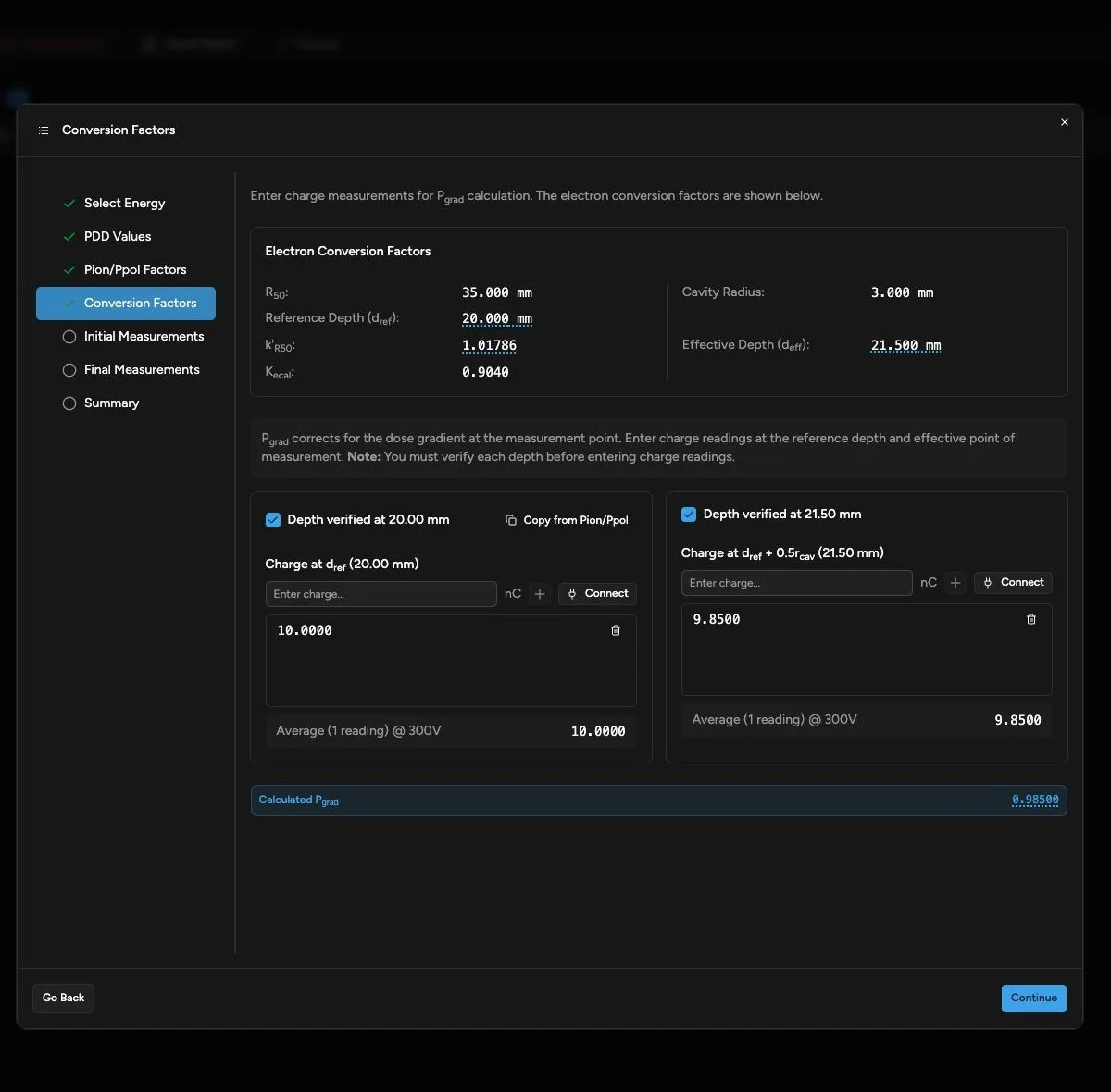
Section titled “Measure Pgrad for AAPM TG-51 (1999)”The Conversion Factors step appears only for AAPM TG-51 (1999). It displays R50, reference depth, k’R50, Kecal, cavity radius, and effective depth.
For Pgrad:
- Verify the chamber at the displayed reference depth.
- Enter or collect the reference-depth readings.
- Move the chamber to the displayed effective point of measurement.
- Verify the chamber position.
- Enter or collect the effective-point readings.
- Review the calculated Pgrad.
Report 385 skips Conversion Factors because it does not use a separately measured Pgr.
Initial and Final Measurements
Section titled “Initial and Final Measurements”Verify the displayed measurement depth before enabling charge entry. Enter readings manually or collect them with a connected electrometer. Review the average, corrected reading, and dose displayed by Quadrant.
Edit, Retire, or Resume
Section titled “Edit, Retire, or Resume”Save or discard pending setup changes before selecting a row and clicking Edit or Retire.
Use Edit to revise the selected calibration’s measurements. Review the wizard summary before saving the new version, then use Show revision history on the row to review its saved versions.
Use Retire when the selected energy should no longer be active. Retirement remains pending until you save and preserves calculation history; you do not need to re-enter the calibration to review its saved evidence. Follow Retire an Active Calibration to review, restore, or save it and confirm the result.
When a saved electron draft exists, verify its energy and restored values before resuming it.
Continue with Export a TG-51 Report.