
Getting Started
Quadrant organizes scan measurements into data sets. A data set is the selected collection of measurements you use before viewing, importing, exporting, or validating scan data.
The documentation also covers Validation comparisons and the separate Calibration > TG-51 workflow for absolute-dose calibration records.
- Create a data set for the machine and work type.
- Open a data set and review its scans.
- Import measurement data into the selected data set.
- Export scan data for another system or review workflow.
- Open the Databook view when you need a structured data summary.
- Use Validation when you need to compare measured and reference scan data.
- Use Calibration > TG-51 when you need to enter or review an absolute-dose calibration.
Key Terms
Section titled “Key Terms”| Term | What It Means |
|---|---|
| Data set | The selected collection of measurements for one linear accelerator, usually organized by source and purpose. |
| Scan | One imported measurement item, such as a PDD, profile, or scatter point set. |
| Wedge factor | A wedged-field value compared with the matching open-field value, shown with the wedge, energy, field size, and calculated factor. |
| Databook | A structured review view that groups the selected data set into clinical beam-data tables. |
| Table export | A quick clipboard or CSV copy of the current scan table after sorting and filtering. |
| Data set export | A generated file package for another system or Databook-style output. |
| TG-51 data set | A calibration record that keeps equipment, conditions, reference setup, and energy-specific absolute-dose results together. |
Before You Begin
Section titled “Before You Begin”Make sure you know which institution, linear accelerator, and data set should receive the data. If you are importing files, keep the original acquisition files available so you can compare names, energies, field sizes, and scan types after import.
Navigation
Section titled “Navigation”Use the Quadrant sidebar under Data:
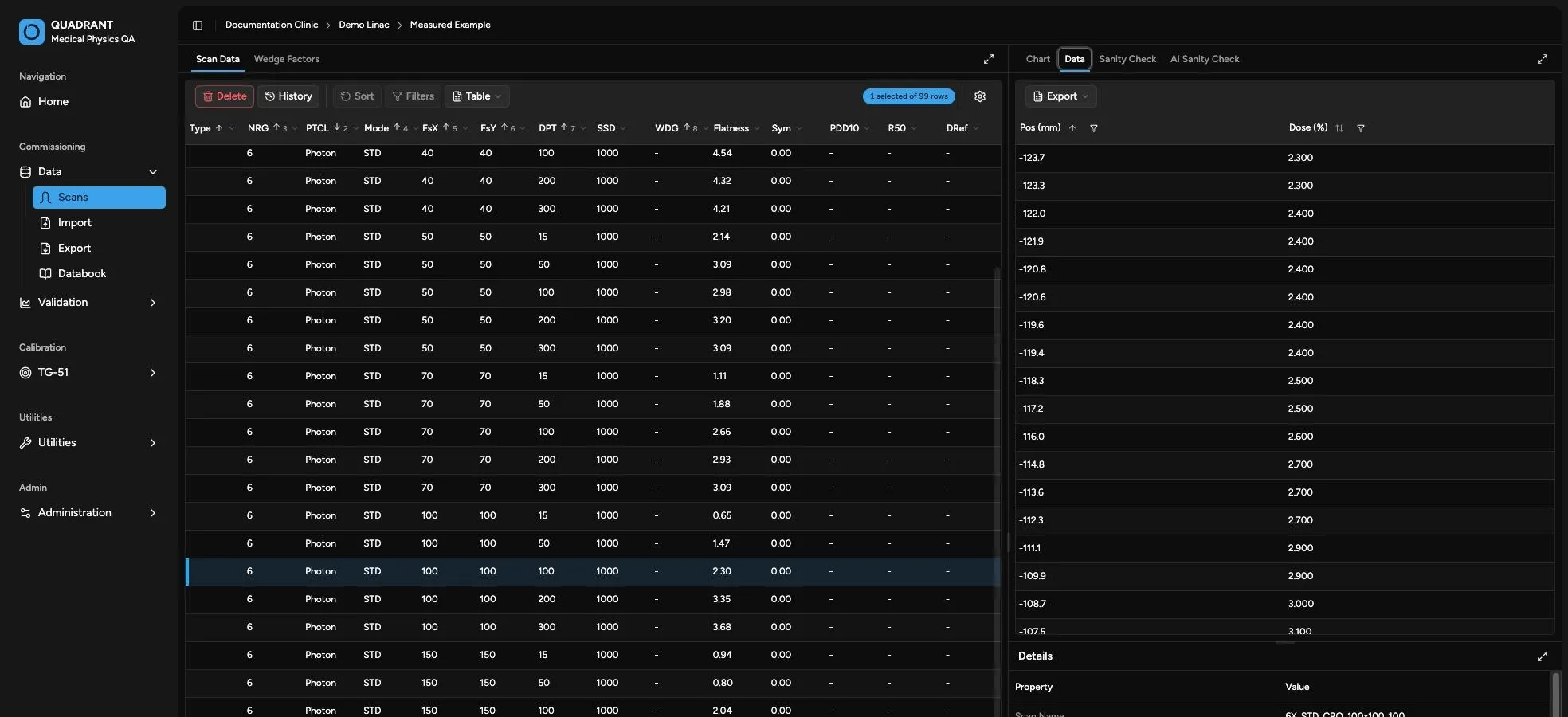
- Scans opens the main data set review page.
- Import opens the import wizard for the selected data set.
- Export opens export options for the selected data set.
- Databook opens the structured data summary view.
The selected data set appears in the header. Click that header selection whenever you need to choose a different institution, linear accelerator, or data set.
For more detail, see Select a Data Set.
Use Validation to compare measured and reference scan data and generate validation reports.
Use Calibration > TG-51 to select or create a TG-51 data set, verify equipment and measurement conditions, enter photon or electron calibrations, and export the calibration report. Start with TG-51 Overview.